
As a senior developer working on large codebases, I've often found myself struggling with challenges that go beyond just finding specific files. Understanding how components interact, documenting complex systems, or onboarding new team members can be incredibly time-consuming tasks that pull me away from actual coding.
These challenges led me to explore how modern AI techniques could enhance developer workflows right where we spend most of our time - in the IDE. In this post, I'll share my journey building CodeCompass, a code intelligence tool that integrates Retrieval-Augmented Generation (RAG) directly into your development environment, using both cloud and local Large Language Models (LLMs) to provide semantic understanding of codebases.

Why We Need Better Code Intelligence Tools
Let me start with a common scenario: you join a new project with hundreds of thousands of lines of code spread across multiple modules. You need to understand:
- How different components interact
- Where specific business logic is implemented
- How to properly extend the system with new features
- What architectural patterns are used
Traditional approaches to these problems have significant limitations:
- Documentation is often outdated or incomplete
- You need to context-switch between your IDE and external tools
- Understanding architectural decisions requires finding the right people to ask
- Generating documentation is tedious and rarely prioritized
I wanted a tool that would understand the codebase at a conceptual level and provide insights directly within my development workflow.
From Search to Conversation: The Evolution of CodeCompass
CodeCompass began as a semantic code search tool for IntelliJ, but has evolved into a comprehensive code intelligence platform with:
- Semantic Code Search: Find relevant files based on natural language queries
- Interactive Chat: Have conversations about your codebase with context from previous questions
- Question Answering: Ask specific questions about code functionality and get detailed explanations
- Multi-IDE Support: Now available for both IntelliJ IDEA and Visual Studio Code
- Multiple AI Provider Options: Support for cloud-based services (OpenRouter, Google Gemini) and local models (Ollama)
The key insight driving this evolution was that developers need more than just search - they need a conversational interface that can maintain context and provide nuanced explanations about complex codebases.
Architecture: Integrating with Multiple IDEs
The architecture of CodeCompass focuses on tight IDE integration while maintaining a consistent core across different platforms:
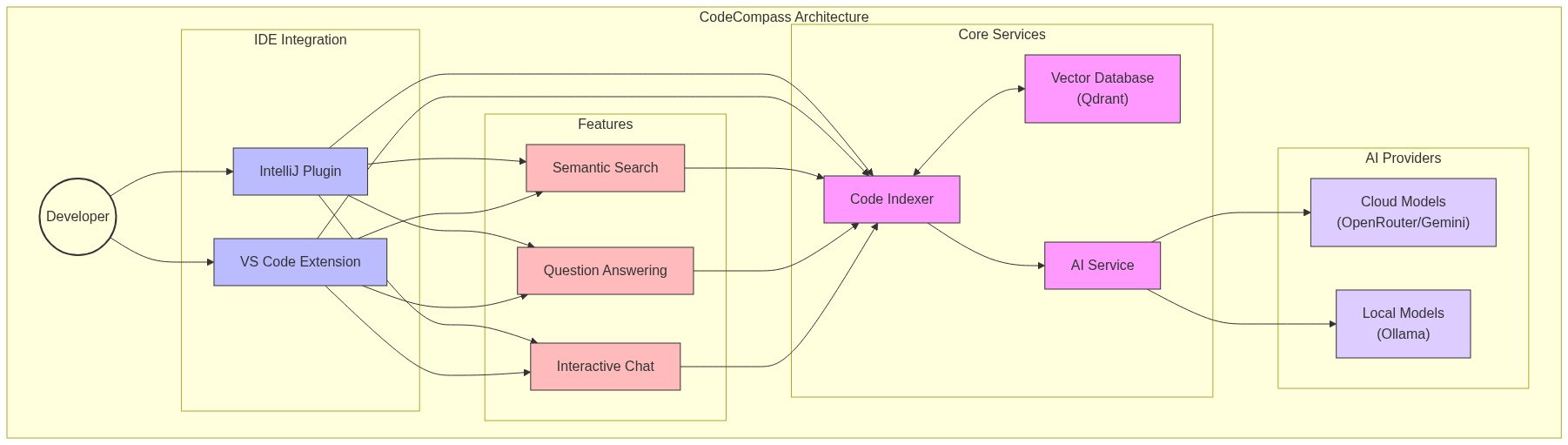
Key Components:
-
Core Services Layer:
- Indexer: Manages the indexing process for code files
- Vector Database Service: Handles embedding storage and retrieval
- AI Service Factory: Provides a unified interface to different AI providers
- Embedding Service: Generates vector representations of code
-
IDE-Specific Integration Layers:
- IntelliJ Platform Integration: Adapts core services to IntelliJ's project model
- VS Code Extension Integration: Connects services to VS Code's extension API
-
User Interface Components:
- Search Dialog: For semantic code search queries
- Question Dialog: For asking specific questions about code
- Chat View: For ongoing conversations about the codebase
This architecture allows CodeCompass to maintain consistent functionality across different IDEs while leveraging the native capabilities of each platform.
The Power of Conversational Code Intelligence
The most significant evolution in CodeCompass has been the addition of conversational capabilities. Unlike traditional search tools that provide a list of results, CodeCompass now offers:
1. Interactive Chat with Memory
The chat interface maintains context across multiple questions, allowing for natural follow-up queries:
User: How does user authentication work in this codebase?
CodeCompass: [Detailed explanation with references to auth files]

User: What about password reset functionality?
CodeCompass: [Explanation that builds on previous context]
This conversational approach is much more natural than repeatedly formulating new search queries.
2. Contextual Code Explanations
When you ask about specific code functionality, CodeCompass doesn't just find relevant files - it explains how they work together:
User: Explain how the payment processing system works
CodeCompass: The payment processing system consists of three main components:

1. PaymentController.java - Handles incoming payment requests and validation
2. PaymentService.java - Orchestrates the payment process
3. PaymentGatewayClient.java - Communicates with external payment providers

When a payment request arrives, it flows through these components as follows...
This contextual understanding is powered by retrieving the most relevant files and using the LLM to synthesize an explanation based on their content.
Implementation Across Multiple IDEs
IntelliJ Platform Integration
The original IntelliJ plugin integrates deeply with the IDE's project model:
- Project Service: Initializes during project startup
- Tool Window: Provides a dedicated UI for search and chat
- Action System: Registers custom actions in menus and toolbars
- PSI Integration: Leverages IntelliJ's Program Structure Interface for code analysis

VS Code Extension
The new VS Code extension offers similar capabilities through VS Code's extension API:
- Webview Integration: Custom UI for search and chat interfaces
- Commands: Registered commands for triggering CodeCompass features
- Activity Bar Integration: Dedicated CodeCompass view in the activity bar
- Workspace API: Integration with VS Code's workspace model
Despite the differences in platform APIs, both implementations share the same core RAG pipeline, ensuring consistent functionality across IDEs.
Multiple AI Provider Options
One of the most requested features was support for different AI providers. CodeCompass now supports:
1. OpenRouter (Cloud)
- Provides access to multiple state-of-the-art models
- Simple API key configuration
- Great for teams already using cloud services
2. Google Gemini (Cloud)
- High-quality embeddings and responses
- Competitive pricing
- Strong performance on code understanding tasks
3. Ollama (Local)
- Complete privacy - code never leaves your machine
- No usage costs
- Works offline
- Support for various open-source code models
This flexibility allows teams to choose the option that best fits their privacy requirements, performance needs, and budget constraints.
Beyond Code Search: The Future of In-IDE Intelligence
With the addition of chat and question-answering capabilities, CodeCompass is evolving into a comprehensive code intelligence platform. Here are some of the advanced use cases now possible:
1. Architectural Understanding
Developers can now have conversations about system architecture:
User: What's the overall architecture of this application?
CodeCompass: This application follows a layered architecture with:

1. Controller layer (com.example.controllers)
2. Service layer (com.example.services)
3. Repository layer (com.example.repositories)
4. Domain model (com.example.domain)

The application uses Spring Boot for dependency injection and...
2. Onboarding Acceleration
New team members can get up to speed quickly:
User: I'm new to the team. How do I add a new API endpoint?
CodeCompass: To add a new API endpoint in this project, you'll need to:

1. Create a new controller method in an existing controller or create a new controller
2. Implement any required service methods
3. Add appropriate tests

Here's an example from the existing codebase...
3. Code Review Assistance
CodeCompass can help with understanding code changes:
User: What does this new PR do?
CodeCompass: Based on the changed files, this PR:

1. Adds a new payment method (cryptocurrency)
2. Updates the payment processing service to handle this method
3. Adds unit tests for the new functionality

The key files to review are...
4. Documentation Generation
Generate documentation at different levels:
User: Document the UserService class
CodeCompass: # UserService

The UserService class handles user management operations including:

- User registration
- Authentication
- Profile updates
- Account deactivation

## Key Methods

- `registerUser(UserDTO)`: Creates a new user account
- `authenticateUser(String, String)`: Validates credentials
...
Challenges and Solutions in Multi-IDE Support
Supporting multiple IDEs introduced several challenges:
1. Different Project Models
IntelliJ and VS Code have fundamentally different project models:
- IntelliJ: Rich PSI (Program Structure Interface) with deep language understanding
- VS Code: Simpler workspace model with file-based operations
Solution: We created an abstraction layer that focuses on file content and metadata, which works across both platforms.
2. UI Integration Differences
Each IDE has its own UI framework:
- IntelliJ: Swing-based UI with tool windows
- VS Code: Webview-based UI with HTML/CSS/JS
Solution: We developed separate UI implementations while maintaining a consistent user experience and feature set.
3. Extension Lifecycle Management
The extension activation and lifecycle events differ between platforms:
- IntelliJ: Project-based activation with complex service lifecycle
- VS Code: Workspace-based activation with simpler extension context
Solution: We implemented platform-specific lifecycle management while ensuring consistent initialization and cleanup.
Local vs. Cloud LLMs: Practical Considerations
With support for both local and cloud LLMs, here are some practical considerations for teams:
| Aspect | Local LLMs (Ollama) | Cloud LLMs (OpenRouter/Gemini) |
|---|---|---|
| Privacy | High (code stays local) | Lower (code sent to API) |
| Setup Effort | Requires local model installation | Simple API key configuration |
| Performance | Depends on local hardware | Consistent, high performance |
| Cost Structure | One-time hardware cost | Pay-per-use API fees |
| Model Quality | Limited by local resources | Access to state-of-the-art models |
| Offline Usage | Works without internet | Requires connectivity |
For most development teams, I recommend:
- Small teams with privacy concerns: Local LLMs via Ollama
- Larger teams with existing cloud infrastructure: Cloud LLMs via OpenRouter or Gemini
- Teams with varying needs: Configure both options and let developers choose
Future Directions
With the foundation of multi-IDE support and conversational capabilities in place, here are some exciting directions for CodeCompass:
1. IDE-Assisted Code Generation
By understanding the existing codebase patterns, CodeCompass could suggest or generate new code that follows established conventions:
User: Generate a new REST controller for managing customer orders
CodeCompass: [Generates controller based on existing patterns in the codebase]
2. Proactive Code Insights
Instead of waiting for questions, CodeCompass could proactively offer insights as you work:
[While editing PaymentService.java]
CodeCompass: This class is referenced by 5 other components. The most important dependency is OrderCheckoutService.java.
3. Cross-Repository Understanding
Extend beyond a single codebase to understand relationships between multiple repositories in a microservice architecture:
User: How does the authentication service interact with the user profile service?
CodeCompass: [Explanation that spans multiple repositories]
4. Collaborative Intelligence
Enable teams to share knowledge through CodeCompass:
User: @team How does our rate limiting work?
CodeCompass: [Generates explanation, notifies team members who can add comments]
Lessons Learned
Building CodeCompass for multiple IDEs has taught me several valuable lessons:
-
Platform-agnostic core, platform-specific integration: Keep your core functionality separate from IDE-specific code.
-
Consistent UX across platforms: Users expect similar experiences regardless of which IDE they use.
-
Provider flexibility is essential: Different teams have different requirements for AI providers.
-
Conversation is more powerful than search: The ability to have a dialogue about code is transformative.
-
Background processing is critical: Long-running tasks must never block the IDE UI.
-
Privacy concerns vary widely: Some teams prioritize privacy above all else, while others value convenience.
Conclusion
The evolution of CodeCompass from a simple search tool to a conversational code intelligence platform represents a significant advancement in developer tooling. By bringing AI capabilities into the environments where developers already work, we can reduce context switching and provide insights exactly when and where they're needed.
The addition of VS Code support alongside the original IntelliJ plugin means that these capabilities are now available to a much wider audience of developers. And with flexible AI provider options, teams can choose the approach that best fits their specific needs.
As LLMs continue to improve and become more efficient, I expect these conversational code intelligence capabilities to become standard features in development environments. The future of software development will involve a much tighter collaboration between human developers and AI assistants that deeply understand our code.
The most exciting aspect of this work is that we're just scratching the surface of what's possible. As we continue to refine these tools and explore new applications, we'll unlock new ways for developers to understand, navigate, and evolve complex codebases more effectively than ever before.