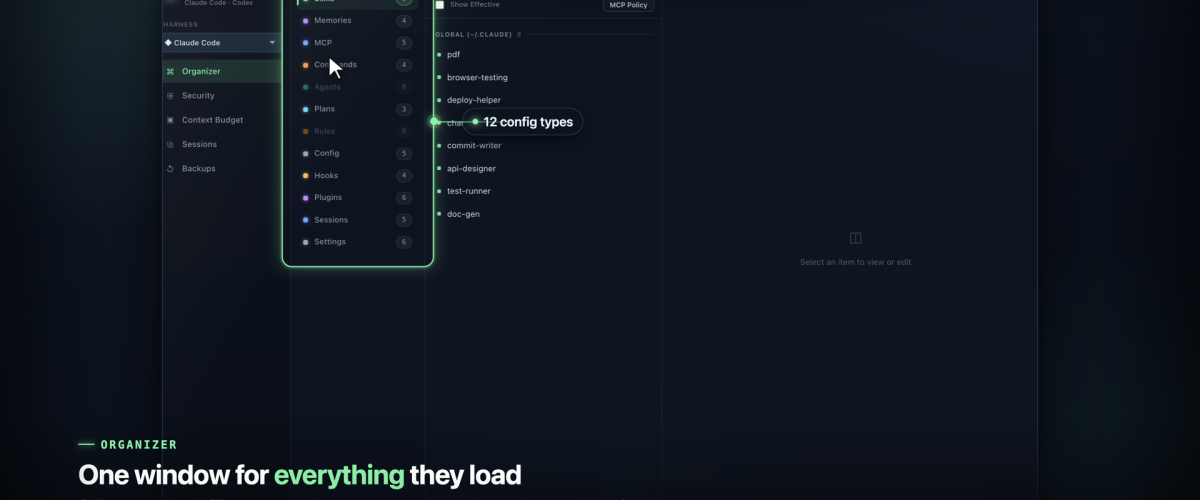

I use Claude Code and Codex CLI every day, and over time both quietly piled up a surprising amount of configuration I never actually looked at. Skills, memories, MCP servers, agents, hooks, commands, plans, rules, settings, spread across global and project scopes. It loads on every run, it shapes how the agent behaves, and most of it lives in dotfiles I forgot I wrote.
So I built Ward: a native macOS app that puts all of it in one window.
What it is
Ward is a config command center for Claude Code and Codex. It reads everything the two tools load out of ~/.claude and ~/.codex and lets you see it, organize it, and clean it up. It is built with Tauri 2, so it is a real Rust core with a native macOS shell. No Electron, no bundled browser, no server. Everything runs locally on your machine.
The organizer is the heart of it: a three column view of every config type, across global and project scopes, with a real editor and one click move, delete, and undo. But the organizer is only one of five modes.
It scans your MCP setup for poisoned servers
The mode that surprised me most is the security scanner. MCP servers are just config, and config can be poisoned. Ward runs 58 rules across your Claude and Codex setup and ranks what it finds by severity. It catches prompt injection hiding in a server's arguments, tokens sitting in plaintext, exfiltration URLs, overly broad filesystem access, shadowed tools.
In my own setup it flagged an MCP argument that was quietly telling the agent to ignore prior instructions and read a private SSH key. That is exactly the kind of thing you never catch by reading dotfiles by hand.
It shows you what is eating your context window
Then there is the context budget view. It uses a real tokenizer to count every source that loads into your context window, your CLAUDE.md files, memories, rules, MCP tool schemas, the system prompt, and shows you exactly what is consuming your 200K before you hit autocompact. If your agent feels dumber than it should, this usually tells you why.
Sessions, backups, and a menu bar agent
Sessions lets you open any transcript, price it per model, and distill or trim it down. Backups is a git backed backup center for your whole config that only touches the network when you click Push, nothing leaves your machine otherwise.
And it lives in your menu bar. Ward runs a small background agent that shows your live Claude and Codex usage, your 5 hour and weekly limits, right at the top of the screen, and runs scheduled scans. One glance tells you how much runway you have left.
Local and open source
The whole thing is local and open source under MIT. I wanted a tool that treats your AI config the way a good editor treats your code: visible, organized, and yours.
Ward is on GitHub at github.com/balakumardev/ward, with a macOS build in Releases (universal, Apple Silicon and Intel). It is a personal project so the builds are not notarized yet, but the source is all there.
If you live in Claude Code or Codex, give it a look. I would genuinely like to know what your first security scan turns up.
Source: github.com/balakumardev/ward